> ## Documentation Index
> Fetch the complete documentation index at: https://docs.kobble.io/llms.txt
> Use this file to discover all available pages before exploring further.
# Go
> Learn how to integrate Kobble using our Go SDK.
## Getting started
### Installation
Download the GO SDK.
```bash theme={null}
go get github.com/kobble-io/go-admin
```
### Exhaustive documentation
You can find the exhaustive documentation of the SDK on [pkg.go.dev](https://pkg.go.dev/github.com/kobble-io/go-admin).
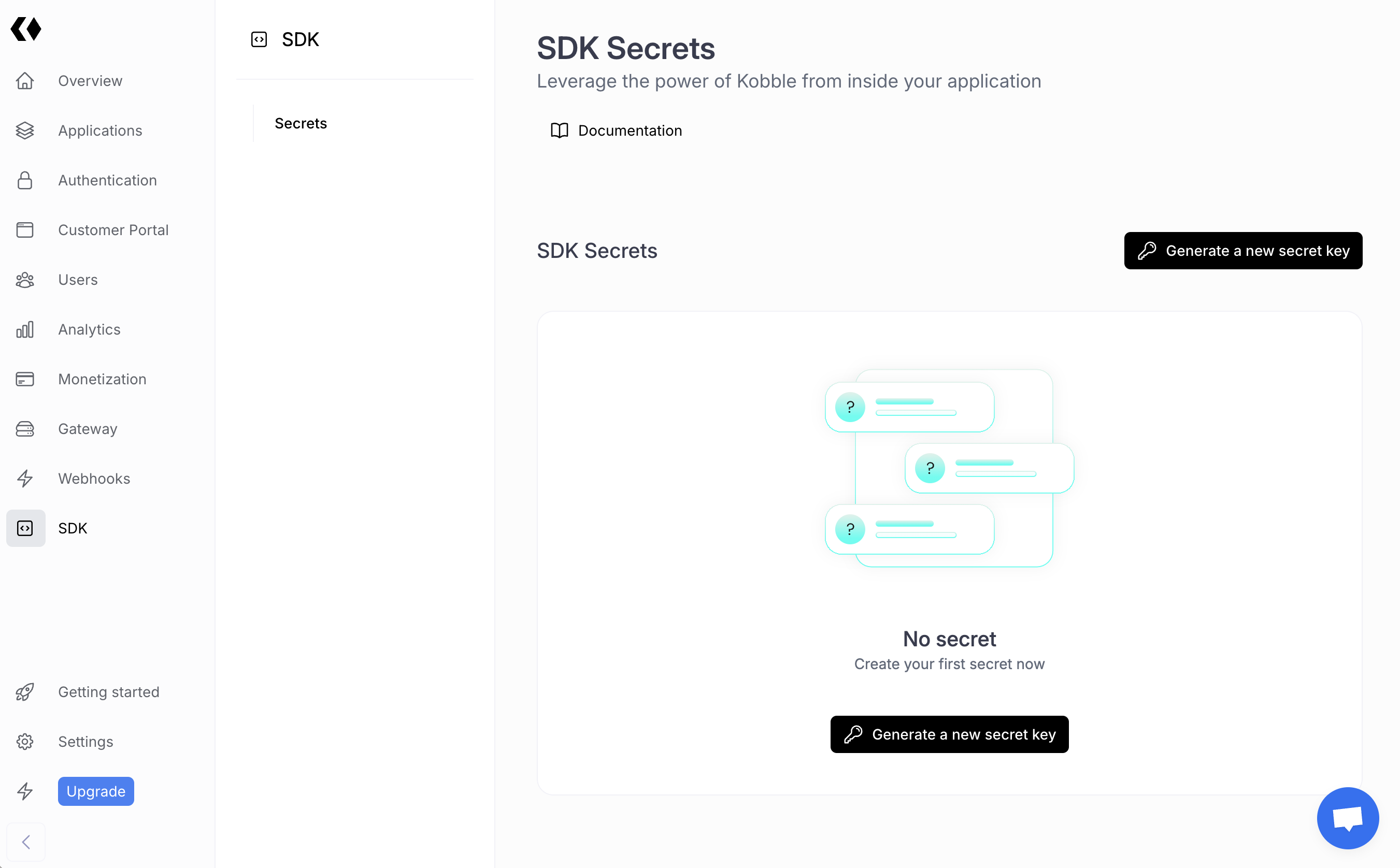
### Get your secret key
You can obtain your secret key from [your dashboard](https://app.kobble.io/p/project/admin-sdk).
 ### Test your integration
```go theme={null}
package kobble
import (
"fmt"
"log"
"os"
"github.com/kobble-io/go-admin/kobble"
)
var secret = os.Getenv("KOBBLE_SECRET")
func main() {
k := kobble.New(secret, kobble.Options{})
whoami, err := k.Whoami()
if err != nil {
log.Fatal(err)
}
fmt.Printf("User ID: %s\n", whoami.UserId)
}
```
## Authentication
These methods allow you to verify that incoming requests on your server come from authenticated and legitimate users.
You can pass either ID Token or Access Token to your backend. To get these tokens, you can use the frontend SDKs.
The ID token is a JWT token that contains the user's identity information.
The Access Token is a JWT token that only contains the user id and project id.
These token are short-lived and should be verified on each request. Never store these tokens backend-side. Keep in mind that the id token may contain some out of date information since it's not generated at each request.
### Verify ID Token
You can verify **ID tokens** obtained using Kobble frontend SDKs as follows:
```ts theme={null}
tk, err := k.Auth.VerifyIdToken("ID_TOKEN")
// Example output:
// {
// userId: 'clu9ob5480001mdhwk9qt00hv',
// user: {
// id: 'clu9ob5480001mdhwk9qt00hv',
// email: 'kevinpiac@gmail.com',
// name: null,
// pictureUrl: null,
// isVerified: true,
// stripeId: null,
// updatedAt: 2024-03-27T10:39:02.000Z,
// createdAt: 2024-03-27T10:39:02.000Z
// },
// claims: { ... }
// }
}
```
### Verify Access Token
You can verify **access tokens** obtained using Kobble frontend SDKs as follows:
```ts theme={null}
tk, err := k.Auth.VerifyAccessToken("ACCESS_TOKEN")
// Example output:
// {
// projectId: 'cltxiphfv000129anb0kuagow',
// userId: 'clu9ob5480001mdhwk9qt00hv',
// claims: {
// sub: 'clu9ob5480001mdhwk9qt00hv',
// project_id: 'cltxiphfv000129anb0kuagow',
// iat: 1713183109,
// exp: 1713186709689,
// iss: 'https://kobble.io',
// aud: 'clu9ntcvr0000o9yfz87ybo4a'
// }
// }
```
## Users
### Create a new user
You can use the `create` method to create a new user with the specified details.
The payload can contain various optional fields, allowing for flexible user creation based on available information.
##### Parameters
The email address of the user.
The name of the user.
The phone number of the user.
Additional metadata about the user, as key-value pairs.
A flag indicating whether the email should be marked as verified.
A flag indicating whether the phone number should be marked as verified.
##### Returns
This function returns a promise that resolves to the newly created user object.
##### Example Usage
```go theme={null}
createdUser, err := k.Users.Create(users.CreateUserPayload{
Email: "johndoe@example.com",
Name: "John Doe",
PhoneNumber: "+1234567890",
Metadata: map[string]any{
"age": 30,
"location": "New York",
},
MarkEmailAsVerified: true,
MarkPhoneNumberAsVerified: false,
})
if err != nil {
log.Fatal(err)
}
```
### Create a login link
You can use the `CreateLoginLink` method to generate a magic link so the user can log in to your Kobble Customer Portal.
This method can be useful when you're building a WhatsApp bot, for example, and you want to send a login link to the user.
This method creates a login link that can be used to log in the user. The link will expire after a certain period.
##### Parameters
The unique identifier of the user for whom the login link is being created.
##### Returns
This function returns a promise that resolves to an object containing the following properties:
* `url` (`string`): The generated login URL.
* `expiresAt` (`Date`): The expiration date and time of the login link.
##### Example Usage
```go theme={null}
link, err := k.Users.CreateLoginLink("USER_ID")
if err != nil {
log.Fatal(err)
}
fmt.Printf("Login link created successfully %s\n", link)
```
### List users
This method allows you to list all users in your project.
For performance reasons, the method will return a maximum of 100 users.
```go theme={null}
users, err := k.Users.ListAll(&users.ListUsersOptions{
Limit: 10,
Page: 1,
})
if err != nil {
log.Fatal(err)
}
fmt.Println(users)
// Example output:
// [{
// id: 'clu9ob5480001mdhwk9qt00hv';
// email: 'hello@kobble.io';
// name: 'Kevin Piacentini';
// createdAt: Date;
// isVerified: true;
// }]
```
### Get user by ID
The `GetById` function is an asynchronous method used to retrieve a user by their unique identifier. This function accepts two parameters: `id` and an optional `options` object.
It throws an error if the user does not exist.
##### Parameters
* `id` (`string`): The unique identifier of the user to be retrieved.
* `options` (`object`, optional): An optional object that can contain the following properties:
* `includeMetadata` (`boolean`, optional): A flag indicating whether to include metadata in the retrieved user information. Default is `false`.
##### Returns
* `Promise`: A promise that resolves to a `User` object containing the user's information.
##### Example Usage
```go theme={null}
u, err := k.Users.GetById("USER_ID", &users.GetUserOptions{
IncludeMetadata: true,
})
if err != nil {
log.Fatal(err)
}
fmt.Println(u)
// Example output:
// {
// id: 'clu9ob5480001mdhwk9qt00hv';
// email: 'hello@kobble.io';
// name: 'Kevin Piacentini';
// createdAt: Date;
// isVerified: true;
// metadata: {};
// };
```
### Get user by email
You can use the `GetByEmail` method to retrieve a user's details using their email address.
This method fetches the user details based on the provided email address. Additional options can be specified to include metadata in the response.
##### Parameters
The email address of the user to be retrieved.
An optional object to specify additional options for retrieving the user. The properties include:
* `includeMetadata` (`boolean`, optional): A flag indicating whether to include the user's metadata in the response.
##### Returns
This function returns a promise that resolves to the user object corresponding to the provided email address.
##### Example Usage
```go theme={null}
u, err := k.Users.GetByEmail("USER_EMAIL", &users.GetUserOptions{
IncludeMetadata: true,
})
if err != nil {
log.Fatal(err)
}
fmt.Println(u)
```
### Find users by Metadata
The `FindByMetadata` function is an asynchronous method used to retrieve users based on specific metadata criteria. This function accepts two parameters: `metadata` and an optional `options` object.
##### Parameters
* `metadata` (`Record`): An object containing the metadata key-value pairs to filter users. The keys and values are both strings.
* `options` (`object`, optional): An optional object that can contain the following properties:
* `page` (`number`, optional): The page number for pagination. Default is `1`.
* `limit` (`number`, optional): The number of users to retrieve per page. Default is `50`.
##### Returns
* `Promise>`: A promise that resolves to a paginated object containing the users that match the metadata criteria.
##### Example Usage
This is how you can find all your users having a location set to 'New York' and a preference set to 'dark':
```go theme={null}
users, err := k.Users.FindByMetadata(map[string]any{
"location": "New York",
"preference": "dark",
}, &users.ListUsersOptions{
Limit: 10,
Page: 2,
})
if err != nil {
log.Fatal(err)
}
fmt.Println(users)
// Example output:
// {
// total: 100,
// page: 2,
// limit: 10,
// data: [
// {
// id: 'clu9ob5480001mdhwk9qt00hv',
// email: 'hello@kobble.io',
// name: 'Kevin Piacentini',
// createdAt: Date,
// isVerified: true,
// metadata: {
// location: 'New York',
// preference: 'dark'
// }
// },
// // ...more users
// ]
// }
```
##### Limitations
Even if the metadata payload can up to 1MB, we recommend keeping your field values as small as possible, especially if you want to search for them. Storing large values in metadata fields can slow down the search process and reveal performance issues on your tenant.
### Update user metadata
You can use the `UpdateMetadata` method to store data into a user.
Unlike `PatchMetadata`, which atomically updates the metadata, this method replaces the entire payload stored in the user's metadata field with the new data provided.
The whole metadata payload must not exceed 1MB, which must be enough for most use cases.
##### Parameters
* `userId` (`string`): The unique identifier of the user whose metadata needs to be updated.
* `metadata` (`Record`): An object containing the metadata key-value pairs to be updated for the user. The keys are strings, and the values can be of any type.
##### Returns
* `void`: This function does not return a value. It performs the update operation on the specified user's metadata.
##### Example Usage
```go theme={null}
_, err := k.Users.PatchMetadata("USER_ID", map[string]any{
"location": "New York",
"preference": "dark",
})
if err != nil {
log.Fatal(err)
}
```
### Patch user metadata
You can use the `patchMetadata` method to atomically update the metadata payload of the user.
Unlike `updateMetadata`, which replaces the whole metadata payload, this method replaces only the provided fields.
The whole metadata payload must not exceed 1MB, which must be enough for most use cases.
##### Parameters
* `userId` (`string`): The unique identifier of the user whose metadata needs to be updated.
* `metadata` (`Record`): An object containing the metadata key-value pairs to be updated for the user. The keys are strings, and the values can be of any type.
##### Returns
* `void`: This function does not return a value. It performs the update operation on the specified user's metadata.
##### Example Usage
```ts theme={null}
_, err := k.Users.UpdateMetadata("USER_ID", map[string]any{
"location": "New York",
"preference": "dark",
})
if err != nil {
log.Fatal(err)
}
```
### Get user product
This method will fetch the product currently attached to the user. It may be a free product or a paid product.
```go theme={null}
product, err := k.Users.GetActiveProducts("USER_ID")
if err != nil {
log.Fatal(err)
}
fmt.Println(product)
// Example output:
// {
// id: 'my-product-id',
// name: 'My Product',
// }
```
## Quotas
### List user quotas
This method will fetch all the quotas usage of the product attached to the user.
It won't fetch quotas not attached to the product of the user.
```ts theme={null}
quotas, err := k.Users.ListQuotas("USER_ID", nil)
if err != nil {
log.Fatal(err)
}
fmt.Println(quotas)
// Example output:
// [{
// name: 'My Quota',
// usage: 100,
// expiresAt: Date,
// remaining: 10,
// limit: 90,
// }]
```
### Check Remaining Quotas
The `HasRemainingQuota` method checks if a user has remaining credit for the specified quota(s).
This is useful to prevent users from exceeding their assigned limits in your application.
You can pass an array of quota names or a single quota name as a string.
```go theme={null}
hasCredit, err := k.Users.HasRemainingQuota("USER_ID", []string{"api-calls", "data-storage"}, nil)
if err != nil {
log.Fatal(err)
}
fmt.Println(hasCredit) // Output: true or false, depending on quota availability
```
### Increment Quota Usage
The `IncrementQuotaUsage` method allows you to increment the usage of a quota for a user.
This is useful when you want to track the usage of a specific quota in your application.
```go theme={null}
err := k.Users.IncrementQuotaUsage("USER_ID", "image-generated", nil)
if err != nil {
log.Fatal(err)
}
```
By default the increment is 1, but you can specify a different increment value.
```go theme={null}
err := k.Users.IncrementQuotaUsage("USER_ID", "image-generated", &users.IncrementQuotaOptions{
IncrementBy: 5,
})
if err != nil {
log.Fatal(err)
}
```
### Decrement Quota Usage
In rare scenarios, you may need to decrement the usage of a quota for a user.
```go theme={null}
err := k.Users.DecrementQuotaUsage("USER_ID", "image-generated", nil)
if err != nil {
log.Fatal(err)
}
```
### Set Quota Usage
The `SetQuotaUsage` method allows you to set the usage of a quota for a user.
This is only useful when you need to set the usage of a quota to a specific value that may be lower or higher than the current usage.
```go theme={null}
err := k.Users.SetQuotaUsage("USER_ID", "image-generated", 10)
if err != nil {
log.Fatal(err)
}
```
## Permissions
### List user permissions
This method will fetch all the permissions of the product attached to the user.
As for quotas, it won't fetch permissions not attached to the product of the user.
```ts theme={null}
perms, err := k.Users.ListPermissions("USER_ID", nil)
if err != nil {
log.Fatal(err)
}
fmt.Println(perms)
// Example output:
// [{ name: 'generate-image' }, { name: 'generate-pdf' }]
```
### Check Permissions
The `HasPermission` method allows you to verify if a user has all the specified permissions.
This is particularly useful for authorization checks within your application.
You can pass an array of permission or a single permission string.
```go theme={null}
hasPermission, err := k.Users.HasPermission("USER_ID", []string{"generate-image", "generate-pdf"}, nil)
if err != nil {
log.Fatal(err)
}
fmt.Println(hasPermission) // Output: true or false, depending on permission availability
```
## Webhooks
The Admin SDK provides an utility function that verifies the signature of incoming webhook events and returns a typed event object.
### Construct Event
You can use the `webhooks.constructEvent()` method to handle incoming webhook events from Kobble.
The list of events you can handle is available in the [webhook events](/product/webhooks/overview) section.
Here's an example with express:
```go theme={null}
package main
import (
"github.com/kobble-io/go-admin/kobble"
"io"
"log"
"net/http"
"github.com/go-chi/chi"
"github.com/go-chi/chi/middleware"
)
// Replace this endpoint secret with your endpoint's unique secret
// If you are using an endpoint defined with the API or dashboard, look in your webhook settings
// at https://app.kobble.io/p/webhooks
const endpointSecret = "..."
type Service struct {
kobble *kobble.Kobble
}
func (s Service) webhookHandler(w http.ResponseWriter, r *http.Request) {
signature := r.Header.Get("Kobble-Signature")
body, err := io.ReadAll(r.Body)
if err != nil {
http.Error(w, "failed to read request body", http.StatusBadRequest)
return
}
event, err := s.kobble.Webhooks.ConstructEvent(body, signature, endpointSecret)
if err != nil {
http.Error(w, err.Error(), http.StatusBadRequest)
return
}
// Handle the event
switch event.Type {
case "user.created":
log.Printf("User created: %v.", event.Data)
case "quota.reached":
log.Printf("User %s reached quota.", event.Data)
// Do something...
default:
log.Printf("Unhandled event type %s.", event.Type)
}
// Return a 200 response to acknowledge receipt of the event
w.WriteHeader(http.StatusOK)
}
func main() {
k := kobble.New("your_secret_key", kobble.Options{})
s := Service{kobble: k}
r := chi.NewRouter()
r.Use(middleware.Logger)
r.Post("/webhook", s.webhookHandler)
log.Println("Running on port 3000")
http.ListenAndServe(":3000", r)
}
```
### Test your integration
```go theme={null}
package kobble
import (
"fmt"
"log"
"os"
"github.com/kobble-io/go-admin/kobble"
)
var secret = os.Getenv("KOBBLE_SECRET")
func main() {
k := kobble.New(secret, kobble.Options{})
whoami, err := k.Whoami()
if err != nil {
log.Fatal(err)
}
fmt.Printf("User ID: %s\n", whoami.UserId)
}
```
## Authentication
These methods allow you to verify that incoming requests on your server come from authenticated and legitimate users.
You can pass either ID Token or Access Token to your backend. To get these tokens, you can use the frontend SDKs.
The ID token is a JWT token that contains the user's identity information.
The Access Token is a JWT token that only contains the user id and project id.
These token are short-lived and should be verified on each request. Never store these tokens backend-side. Keep in mind that the id token may contain some out of date information since it's not generated at each request.
### Verify ID Token
You can verify **ID tokens** obtained using Kobble frontend SDKs as follows:
```ts theme={null}
tk, err := k.Auth.VerifyIdToken("ID_TOKEN")
// Example output:
// {
// userId: 'clu9ob5480001mdhwk9qt00hv',
// user: {
// id: 'clu9ob5480001mdhwk9qt00hv',
// email: 'kevinpiac@gmail.com',
// name: null,
// pictureUrl: null,
// isVerified: true,
// stripeId: null,
// updatedAt: 2024-03-27T10:39:02.000Z,
// createdAt: 2024-03-27T10:39:02.000Z
// },
// claims: { ... }
// }
}
```
### Verify Access Token
You can verify **access tokens** obtained using Kobble frontend SDKs as follows:
```ts theme={null}
tk, err := k.Auth.VerifyAccessToken("ACCESS_TOKEN")
// Example output:
// {
// projectId: 'cltxiphfv000129anb0kuagow',
// userId: 'clu9ob5480001mdhwk9qt00hv',
// claims: {
// sub: 'clu9ob5480001mdhwk9qt00hv',
// project_id: 'cltxiphfv000129anb0kuagow',
// iat: 1713183109,
// exp: 1713186709689,
// iss: 'https://kobble.io',
// aud: 'clu9ntcvr0000o9yfz87ybo4a'
// }
// }
```
## Users
### Create a new user
You can use the `create` method to create a new user with the specified details.
The payload can contain various optional fields, allowing for flexible user creation based on available information.
##### Parameters
The email address of the user.
The name of the user.
The phone number of the user.
Additional metadata about the user, as key-value pairs.
A flag indicating whether the email should be marked as verified.
A flag indicating whether the phone number should be marked as verified.
##### Returns
This function returns a promise that resolves to the newly created user object.
##### Example Usage
```go theme={null}
createdUser, err := k.Users.Create(users.CreateUserPayload{
Email: "johndoe@example.com",
Name: "John Doe",
PhoneNumber: "+1234567890",
Metadata: map[string]any{
"age": 30,
"location": "New York",
},
MarkEmailAsVerified: true,
MarkPhoneNumberAsVerified: false,
})
if err != nil {
log.Fatal(err)
}
```
### Create a login link
You can use the `CreateLoginLink` method to generate a magic link so the user can log in to your Kobble Customer Portal.
This method can be useful when you're building a WhatsApp bot, for example, and you want to send a login link to the user.
This method creates a login link that can be used to log in the user. The link will expire after a certain period.
##### Parameters
The unique identifier of the user for whom the login link is being created.
##### Returns
This function returns a promise that resolves to an object containing the following properties:
* `url` (`string`): The generated login URL.
* `expiresAt` (`Date`): The expiration date and time of the login link.
##### Example Usage
```go theme={null}
link, err := k.Users.CreateLoginLink("USER_ID")
if err != nil {
log.Fatal(err)
}
fmt.Printf("Login link created successfully %s\n", link)
```
### List users
This method allows you to list all users in your project.
For performance reasons, the method will return a maximum of 100 users.
```go theme={null}
users, err := k.Users.ListAll(&users.ListUsersOptions{
Limit: 10,
Page: 1,
})
if err != nil {
log.Fatal(err)
}
fmt.Println(users)
// Example output:
// [{
// id: 'clu9ob5480001mdhwk9qt00hv';
// email: 'hello@kobble.io';
// name: 'Kevin Piacentini';
// createdAt: Date;
// isVerified: true;
// }]
```
### Get user by ID
The `GetById` function is an asynchronous method used to retrieve a user by their unique identifier. This function accepts two parameters: `id` and an optional `options` object.
It throws an error if the user does not exist.
##### Parameters
* `id` (`string`): The unique identifier of the user to be retrieved.
* `options` (`object`, optional): An optional object that can contain the following properties:
* `includeMetadata` (`boolean`, optional): A flag indicating whether to include metadata in the retrieved user information. Default is `false`.
##### Returns
* `Promise`: A promise that resolves to a `User` object containing the user's information.
##### Example Usage
```go theme={null}
u, err := k.Users.GetById("USER_ID", &users.GetUserOptions{
IncludeMetadata: true,
})
if err != nil {
log.Fatal(err)
}
fmt.Println(u)
// Example output:
// {
// id: 'clu9ob5480001mdhwk9qt00hv';
// email: 'hello@kobble.io';
// name: 'Kevin Piacentini';
// createdAt: Date;
// isVerified: true;
// metadata: {};
// };
```
### Get user by email
You can use the `GetByEmail` method to retrieve a user's details using their email address.
This method fetches the user details based on the provided email address. Additional options can be specified to include metadata in the response.
##### Parameters
The email address of the user to be retrieved.
An optional object to specify additional options for retrieving the user. The properties include:
* `includeMetadata` (`boolean`, optional): A flag indicating whether to include the user's metadata in the response.
##### Returns
This function returns a promise that resolves to the user object corresponding to the provided email address.
##### Example Usage
```go theme={null}
u, err := k.Users.GetByEmail("USER_EMAIL", &users.GetUserOptions{
IncludeMetadata: true,
})
if err != nil {
log.Fatal(err)
}
fmt.Println(u)
```
### Find users by Metadata
The `FindByMetadata` function is an asynchronous method used to retrieve users based on specific metadata criteria. This function accepts two parameters: `metadata` and an optional `options` object.
##### Parameters
* `metadata` (`Record`): An object containing the metadata key-value pairs to filter users. The keys and values are both strings.
* `options` (`object`, optional): An optional object that can contain the following properties:
* `page` (`number`, optional): The page number for pagination. Default is `1`.
* `limit` (`number`, optional): The number of users to retrieve per page. Default is `50`.
##### Returns
* `Promise>`: A promise that resolves to a paginated object containing the users that match the metadata criteria.
##### Example Usage
This is how you can find all your users having a location set to 'New York' and a preference set to 'dark':
```go theme={null}
users, err := k.Users.FindByMetadata(map[string]any{
"location": "New York",
"preference": "dark",
}, &users.ListUsersOptions{
Limit: 10,
Page: 2,
})
if err != nil {
log.Fatal(err)
}
fmt.Println(users)
// Example output:
// {
// total: 100,
// page: 2,
// limit: 10,
// data: [
// {
// id: 'clu9ob5480001mdhwk9qt00hv',
// email: 'hello@kobble.io',
// name: 'Kevin Piacentini',
// createdAt: Date,
// isVerified: true,
// metadata: {
// location: 'New York',
// preference: 'dark'
// }
// },
// // ...more users
// ]
// }
```
##### Limitations
Even if the metadata payload can up to 1MB, we recommend keeping your field values as small as possible, especially if you want to search for them. Storing large values in metadata fields can slow down the search process and reveal performance issues on your tenant.
### Update user metadata
You can use the `UpdateMetadata` method to store data into a user.
Unlike `PatchMetadata`, which atomically updates the metadata, this method replaces the entire payload stored in the user's metadata field with the new data provided.
The whole metadata payload must not exceed 1MB, which must be enough for most use cases.
##### Parameters
* `userId` (`string`): The unique identifier of the user whose metadata needs to be updated.
* `metadata` (`Record`): An object containing the metadata key-value pairs to be updated for the user. The keys are strings, and the values can be of any type.
##### Returns
* `void`: This function does not return a value. It performs the update operation on the specified user's metadata.
##### Example Usage
```go theme={null}
_, err := k.Users.PatchMetadata("USER_ID", map[string]any{
"location": "New York",
"preference": "dark",
})
if err != nil {
log.Fatal(err)
}
```
### Patch user metadata
You can use the `patchMetadata` method to atomically update the metadata payload of the user.
Unlike `updateMetadata`, which replaces the whole metadata payload, this method replaces only the provided fields.
The whole metadata payload must not exceed 1MB, which must be enough for most use cases.
##### Parameters
* `userId` (`string`): The unique identifier of the user whose metadata needs to be updated.
* `metadata` (`Record`): An object containing the metadata key-value pairs to be updated for the user. The keys are strings, and the values can be of any type.
##### Returns
* `void`: This function does not return a value. It performs the update operation on the specified user's metadata.
##### Example Usage
```ts theme={null}
_, err := k.Users.UpdateMetadata("USER_ID", map[string]any{
"location": "New York",
"preference": "dark",
})
if err != nil {
log.Fatal(err)
}
```
### Get user product
This method will fetch the product currently attached to the user. It may be a free product or a paid product.
```go theme={null}
product, err := k.Users.GetActiveProducts("USER_ID")
if err != nil {
log.Fatal(err)
}
fmt.Println(product)
// Example output:
// {
// id: 'my-product-id',
// name: 'My Product',
// }
```
## Quotas
### List user quotas
This method will fetch all the quotas usage of the product attached to the user.
It won't fetch quotas not attached to the product of the user.
```ts theme={null}
quotas, err := k.Users.ListQuotas("USER_ID", nil)
if err != nil {
log.Fatal(err)
}
fmt.Println(quotas)
// Example output:
// [{
// name: 'My Quota',
// usage: 100,
// expiresAt: Date,
// remaining: 10,
// limit: 90,
// }]
```
### Check Remaining Quotas
The `HasRemainingQuota` method checks if a user has remaining credit for the specified quota(s).
This is useful to prevent users from exceeding their assigned limits in your application.
You can pass an array of quota names or a single quota name as a string.
```go theme={null}
hasCredit, err := k.Users.HasRemainingQuota("USER_ID", []string{"api-calls", "data-storage"}, nil)
if err != nil {
log.Fatal(err)
}
fmt.Println(hasCredit) // Output: true or false, depending on quota availability
```
### Increment Quota Usage
The `IncrementQuotaUsage` method allows you to increment the usage of a quota for a user.
This is useful when you want to track the usage of a specific quota in your application.
```go theme={null}
err := k.Users.IncrementQuotaUsage("USER_ID", "image-generated", nil)
if err != nil {
log.Fatal(err)
}
```
By default the increment is 1, but you can specify a different increment value.
```go theme={null}
err := k.Users.IncrementQuotaUsage("USER_ID", "image-generated", &users.IncrementQuotaOptions{
IncrementBy: 5,
})
if err != nil {
log.Fatal(err)
}
```
### Decrement Quota Usage
In rare scenarios, you may need to decrement the usage of a quota for a user.
```go theme={null}
err := k.Users.DecrementQuotaUsage("USER_ID", "image-generated", nil)
if err != nil {
log.Fatal(err)
}
```
### Set Quota Usage
The `SetQuotaUsage` method allows you to set the usage of a quota for a user.
This is only useful when you need to set the usage of a quota to a specific value that may be lower or higher than the current usage.
```go theme={null}
err := k.Users.SetQuotaUsage("USER_ID", "image-generated", 10)
if err != nil {
log.Fatal(err)
}
```
## Permissions
### List user permissions
This method will fetch all the permissions of the product attached to the user.
As for quotas, it won't fetch permissions not attached to the product of the user.
```ts theme={null}
perms, err := k.Users.ListPermissions("USER_ID", nil)
if err != nil {
log.Fatal(err)
}
fmt.Println(perms)
// Example output:
// [{ name: 'generate-image' }, { name: 'generate-pdf' }]
```
### Check Permissions
The `HasPermission` method allows you to verify if a user has all the specified permissions.
This is particularly useful for authorization checks within your application.
You can pass an array of permission or a single permission string.
```go theme={null}
hasPermission, err := k.Users.HasPermission("USER_ID", []string{"generate-image", "generate-pdf"}, nil)
if err != nil {
log.Fatal(err)
}
fmt.Println(hasPermission) // Output: true or false, depending on permission availability
```
## Webhooks
The Admin SDK provides an utility function that verifies the signature of incoming webhook events and returns a typed event object.
### Construct Event
You can use the `webhooks.constructEvent()` method to handle incoming webhook events from Kobble.
The list of events you can handle is available in the [webhook events](/product/webhooks/overview) section.
Here's an example with express:
```go theme={null}
package main
import (
"github.com/kobble-io/go-admin/kobble"
"io"
"log"
"net/http"
"github.com/go-chi/chi"
"github.com/go-chi/chi/middleware"
)
// Replace this endpoint secret with your endpoint's unique secret
// If you are using an endpoint defined with the API or dashboard, look in your webhook settings
// at https://app.kobble.io/p/webhooks
const endpointSecret = "..."
type Service struct {
kobble *kobble.Kobble
}
func (s Service) webhookHandler(w http.ResponseWriter, r *http.Request) {
signature := r.Header.Get("Kobble-Signature")
body, err := io.ReadAll(r.Body)
if err != nil {
http.Error(w, "failed to read request body", http.StatusBadRequest)
return
}
event, err := s.kobble.Webhooks.ConstructEvent(body, signature, endpointSecret)
if err != nil {
http.Error(w, err.Error(), http.StatusBadRequest)
return
}
// Handle the event
switch event.Type {
case "user.created":
log.Printf("User created: %v.", event.Data)
case "quota.reached":
log.Printf("User %s reached quota.", event.Data)
// Do something...
default:
log.Printf("Unhandled event type %s.", event.Type)
}
// Return a 200 response to acknowledge receipt of the event
w.WriteHeader(http.StatusOK)
}
func main() {
k := kobble.New("your_secret_key", kobble.Options{})
s := Service{kobble: k}
r := chi.NewRouter()
r.Use(middleware.Logger)
r.Post("/webhook", s.webhookHandler)
log.Println("Running on port 3000")
http.ListenAndServe(":3000", r)
}
```